
Handling Inbound Inquiry Response with Bolt Agents

Is Your Website Chat Driving Students Away?
Most schools already use some form of live chat widget on their website, often powered by pre-programmed chatbots. These bots can provide canned answers to common questions, but they require constant upkeep from staff to stay current. The result? Students get generic, scripted replies—or worse, no useful answer at all when their question falls outside the script.
Every unanswered or robotic-sounding chat is a missed opportunity to build trust and move a prospect forward in their journey. Traditional chatbots depend heavily on staff availability for updates and escalations, which means replies are inconsistent, outdated, or delayed. Instead of feeling supported, students leave frustrated—often abandoning the conversation and your site altogether.

The Problem
Live chat widgets or pre-programmed chatbots rely on scripted answers and constant staff upkeep. They struggle when a student’s question doesn’t match a pre-written response, leaving the student frustrated—or worse, ignored. Meanwhile, staff still end up overloaded with escalations and manual updates.
Instead of delivering immediacy and clarity, traditional chat often creates bottlenecks, inconsistency, and student disappointment.
◉ 71% of students expect instant responses online, but scripted chatbots often provide irrelevant or incomplete answers.
◉ Nearly 60% of chatbot users abandon the chat when their question isn’t understood on the first try.
◉ Staff spend hours weekly maintaining bot scripts, FAQs, and routing rules—time that could be spent with students.
◉ After-hours coverage gaps leave chats unanswered until the next business day, eroding trust at critical decision points.
Old Way vs. Agentic Way
The Before and After of Handling Inbounds with Live Chat
 |  | |
|---|---|---|
| Response time | Minutes to days; depends on staff availability | Instant, 24/7 replies grounded in knowledge base |
| Coverage | Business hours; gaps evenings/weekends | Always-on coverage across time zones |
| Consistency & accuracy | Varies by who’s replying, risk of outdated info | Knowledge-hub grounded answers in your brand voice |
| Intake & triage | Manual queue watching and copy/paste FAQs | Automatic triage with conversation starters |
| Routing & escalation | Manual forwarding; context gets lost | Handoff rules route to the right staff with full context |
| Skills / actions | Limited to basic chat; staff must complete tasks | Agents configured with multiple skills |
| Student experience | Waits, repetition, inconsistent tone | Immediate, on-brand, multilingual responses with clear next steps |
| Staff effort | Inbox babysitting; repetitive questions | Agents handle FAQs and transactions |
| Visibility & reporting | Scattered transcripts; hard to measure impact | Insights dashboards reveal response times, gaps, and outcomes |
| Compliance & safety | Ad-hoc moderation; risky content slips through | Content Moderation flags/blocks harmful content; opt-out controls |
| Response time | |
|---|---|
| Old Way (Human) | Minutes to days; depends on staff availability |
| New Way (AI Powered) | Instant, 24/7 replies grounded in knowledge base |
| Coverage | |
| Old Way (Human) | Business hours; gaps evenings/weekends |
| New Way (AI Powered) | Always-on coverage across time zones |
| Consistency & accuracy | |
| Old Way (Human) | Varies by who’s replying, risk of outdated info |
| New Way (AI Powered) | Knowledge-hub grounded answers in your brand voice |
| Intake & triage | |
| Old Way (Human) | Manual queue watching and copy/paste FAQs |
| New Way (AI Powered) | Automatic triage with conversation starters |
| Routing & escalation | |
| Old Way (Human) | Manual forwarding; context gets lost |
| New Way (AI Powered) | Handoff rules route to the right staff with full context |
| Skills / actions | |
| Old Way (Human) | Limited to basic chat; staff must complete tasks |
| New Way (AI Powered) | Agents configured with multiple skills |
| Student experience | |
| Old Way (Human) | Waits, repetition, inconsistent tone |
| New Way (AI Powered) | Immediate, on-brand, multilingual responses with clear next steps |
| Staff effort | |
| Old Way (Human) | Inbox babysitting; repetitive questions |
| New Way (AI Powered) | Agents handle FAQs and transactions |
| Visibility & reporting | |
| Old Way (Human) | Scattered transcripts; hard to measure impact |
| New Way (AI Powered) | Insights dashboards reveal response times, gaps, and outcomes |
| Compliance & safety | |
| Old Way (Human) | Ad-hoc moderation; risky content slips through |
| New Way (AI Powered) | Content Moderation flags/blocks harmful content; opt-out controls |
The Solution (With Bolt Agents)
Element451’s Bolt Agents power Live Chat to handle inbound inquiries instantly, 24/7. They respond with institution-approved knowledge, execute skills like event registration or application status checks, and seamlessly escalate to human staff when needed.
With AI Agents embedded into your website, portals, or pages, every inquiry gets an immediate, branded, student-first response.
◉ Instant replies 24/7/365 in any language.
◉ Unified inbox links chat records to the student record for full context.
◉ Skills-enabled agents register for events, schedule appointments, and check application status by text.
◉ Smart escalation ensures sensitive questions are routed to staff seamlessly.
How It Works (10 Steps)
When a student engages your institution's chatbot, Element451’s AI workforce is ready. Bolt Agents respond instantly in your brand voice, complete tasks like scheduling or status checks, and hand off to staff when needed. All replies are grounded in your Knowledge Hub, ensuring accuracy and consistency.
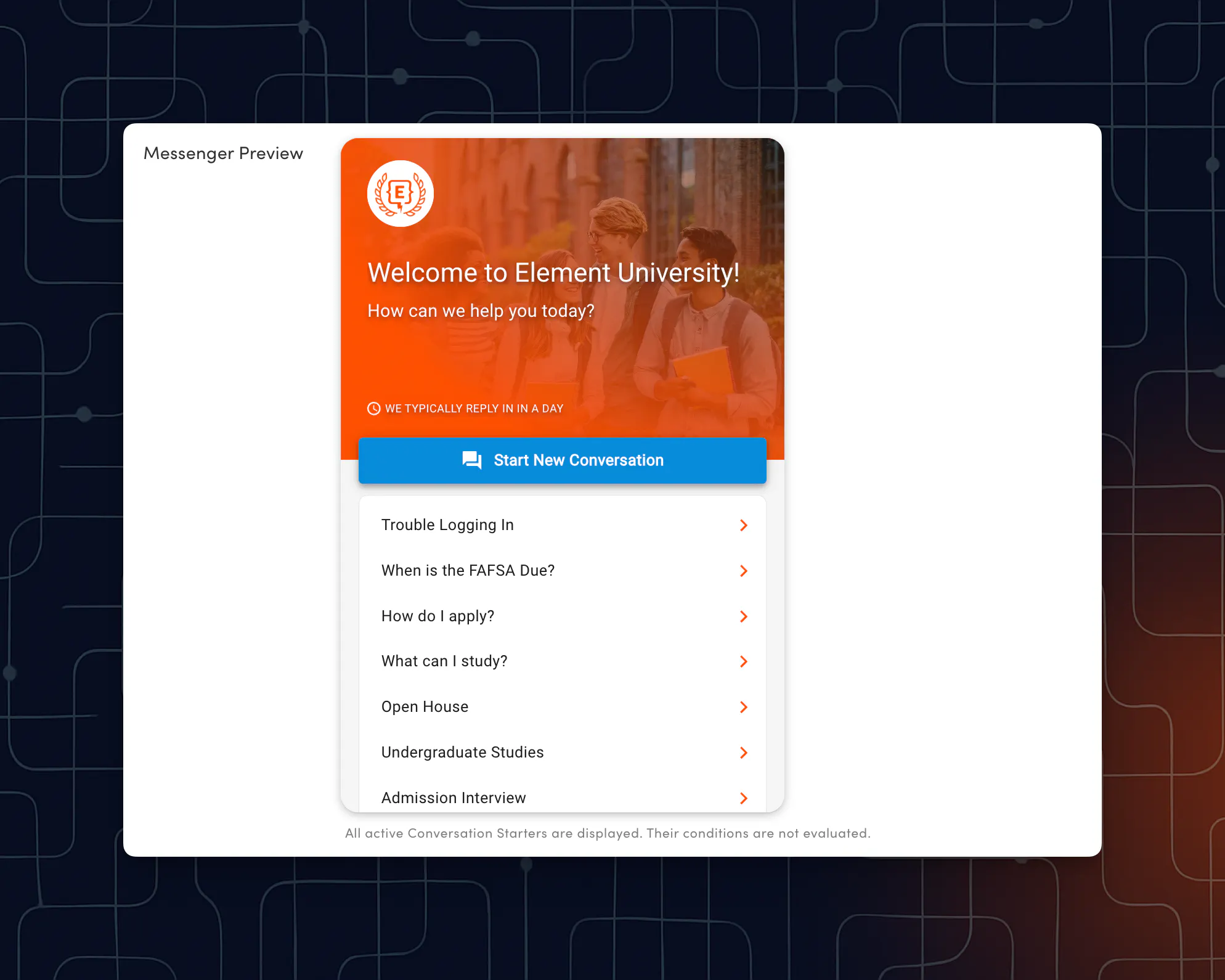
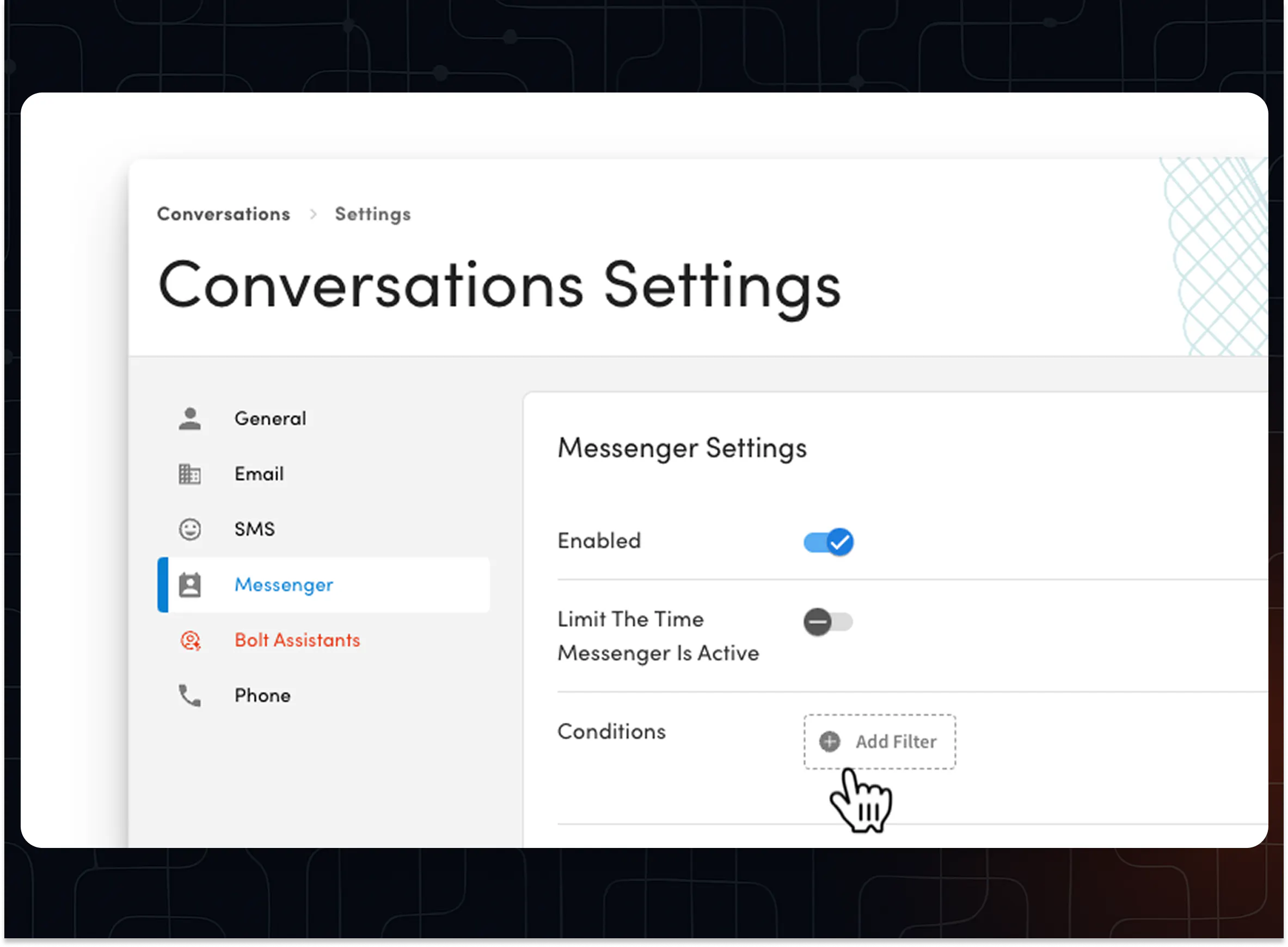
Step 1: Configure Messenger Settings
◉ In Conversation Settings, configure the Messenger settings to set your preferences for branding of the widget and more.
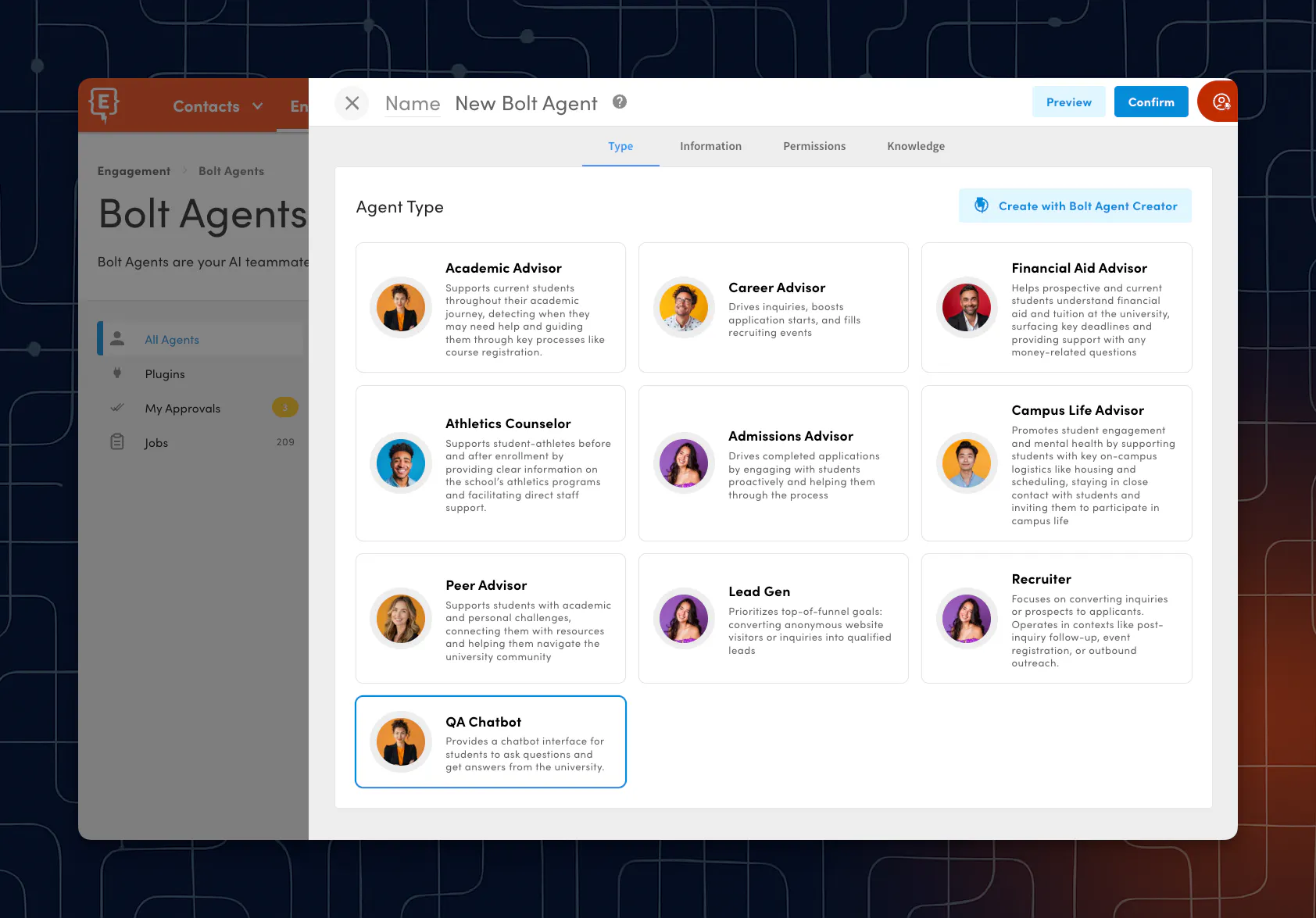
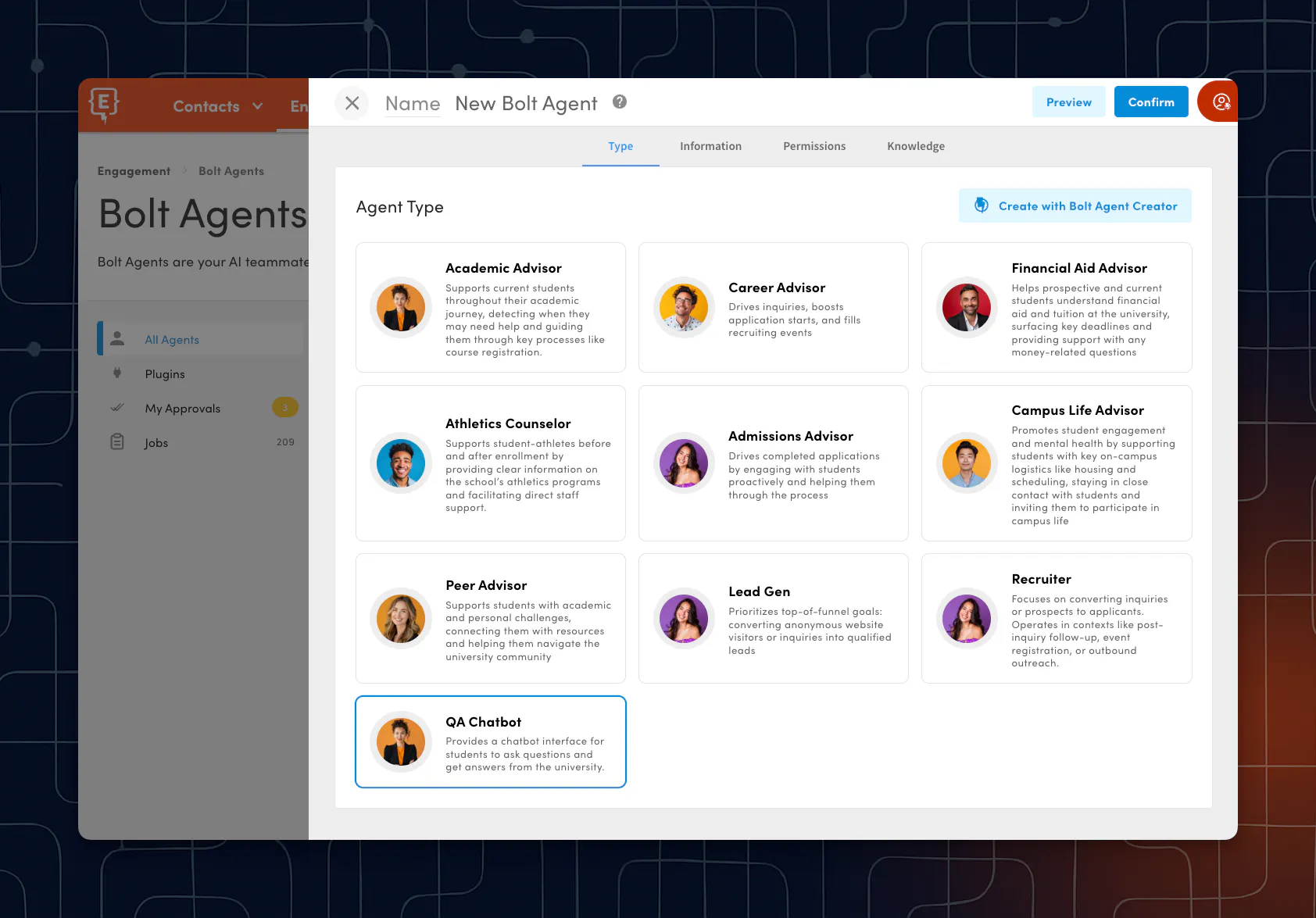
Step 2: Onboard or Select a Bolt Agent to Handle Inbound Chat
◉ Onboard a new agent (like the QA Chatbot) or configure an existing agent.
✨ Pro Tip: If you need to create a new agent to manage conversations, consider using the Bolt Agent Creator Agent.
◉ Enable the Messenger channel in agent settings.
◉ Enable skills for the agent as needed (e.g., register for events, schedule appointments, check application status).
Step 3: Add/Update Knowledge Hub Sources
◉ Populate your knowledge hub with FAQs, program pages, policies, and deadlines, etc, so that the agent has a repository to use when assisting students, parents, etc.
✨ Pro Tip: Once knowledge has been added, you can return to step 2 and scope the agent's access to specific knowledge sources, if needed.

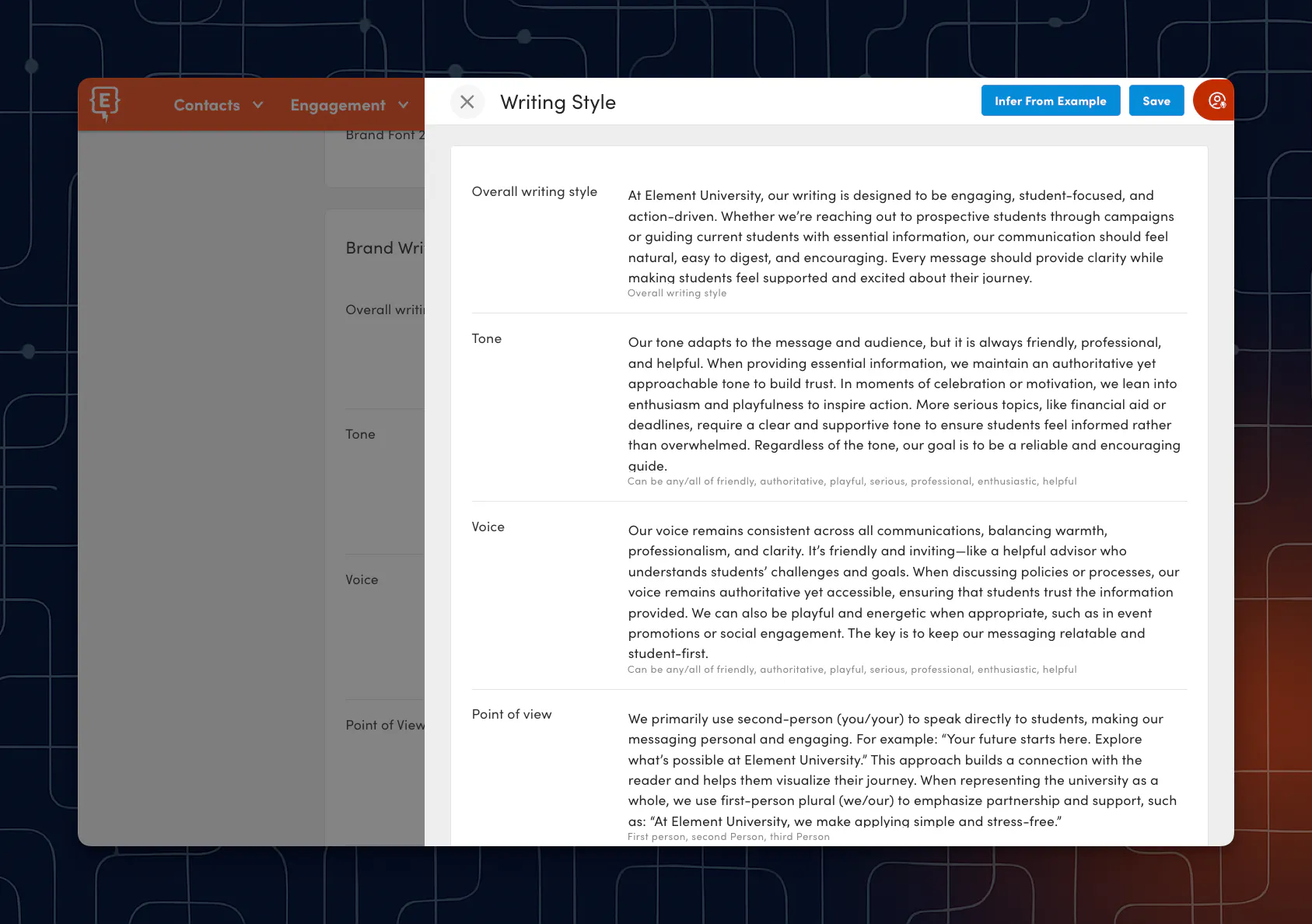
Step 4: Add/Update Brand Writing Style Settings
◉ Element451's Brand Writing Style settings offer a powerful way to ensure that the content generated by Bolt Agents resonates with your brand’s unique voice and communication objectives.
✨ Pro Tip: Customizing aspects such as tone, voice, and structure allows you to create content that aligns with your brand’s personality and effectively engages your audience.
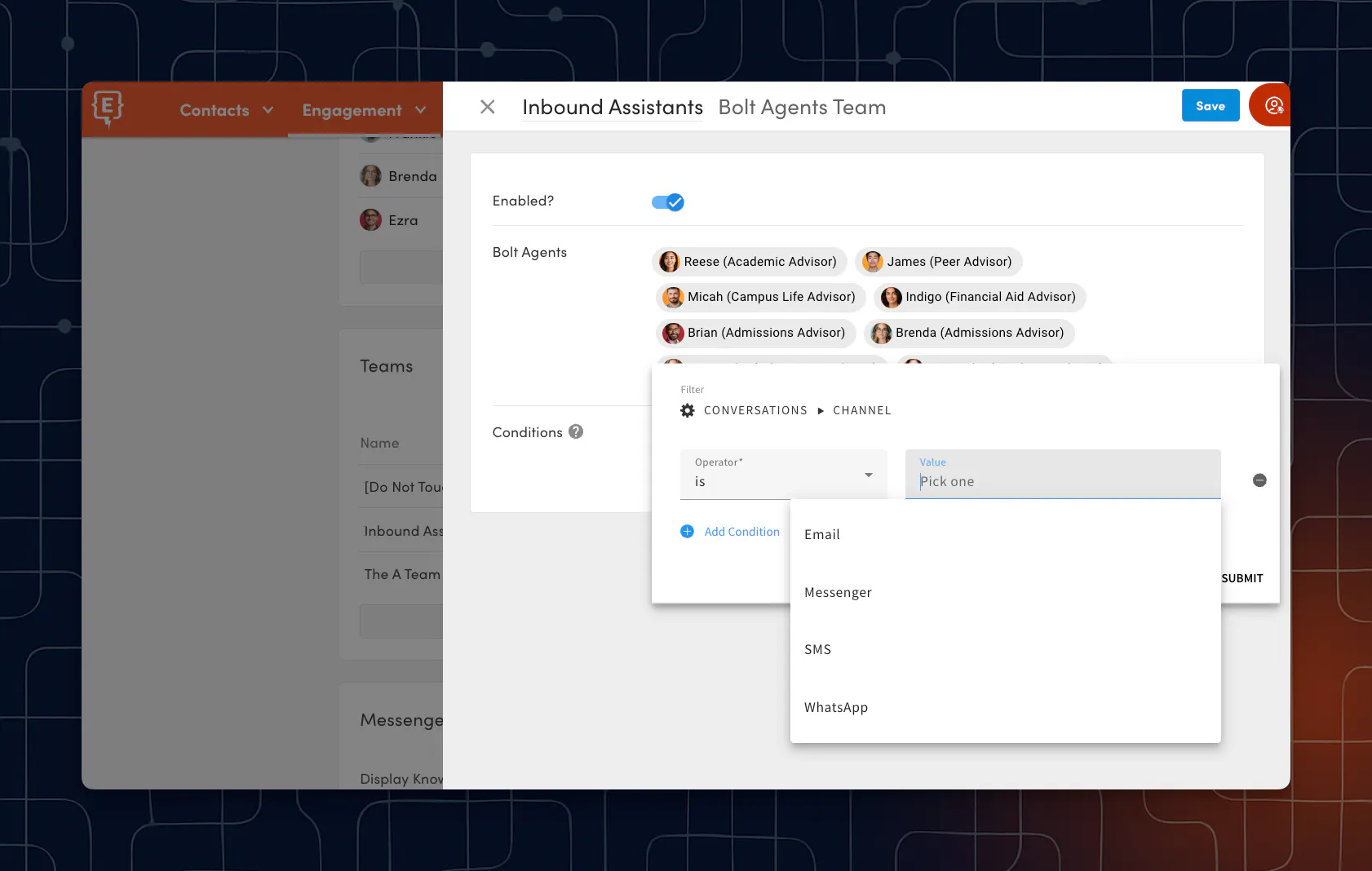
Step 5: Assign Your Agent to a Team
◉ Assign your agent to a team and set team conditions—like page URLs, path URLs, or UTM parameters—to control exactly where Messenger appears. This targets the right agents to the right audiences on the right pages.
Step 6: Enable and Embed the Messenger on Element451 Pages and External Websites
◉ Displaying Messenger on your internal Element451 pages and sites requires no coding. Simply activate the “Activate Messenger” setting within each module where you want Messenger available.
◉ Add the Messenger embed code to your school webpage header or site-wide header to display Messenger on your external site.
✨ Pro Tip: Adding the embed code not only enables Messenger, it also installs the Element451 Tracking Pixel and allows you to call Bolt Discovery functions.
Step 7: Configure Handoff Rules
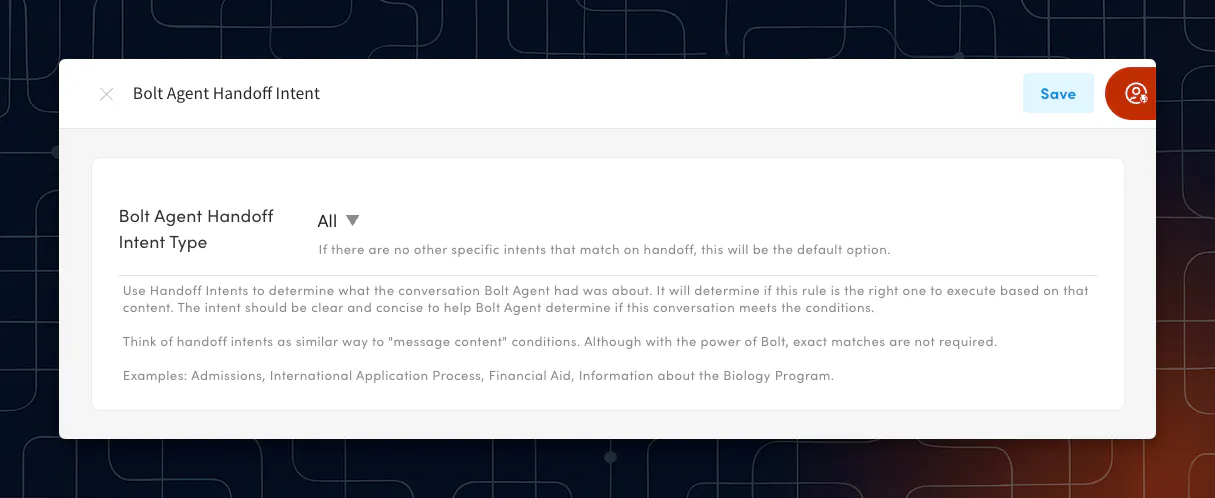
◉ Create a Conversation Rule using a "bolt agent handoff intent" condition to route conversations to staff when the agent is unable to answer the student's question or the student requests to speak to a staff member.
Step 8: Bolt Agent Content Moderation
◉ Bolt Agents scan inbound messages for harmful or inappropriate content. You can configure flag preferences in Bolt Agent settings and use Conversation Rules to add additional automation when flags are raised.

Step 9: Agent Responds
◉ The agent replies instantly, drawing on conversation history, your curated knowledge hub, and enabled skills.
◉ If a handoff occurs or a staff member joins a conversation, they can use Copywriting Agent and other writing tools for efficient, high-quality replies.
✨ Pro Tip: Bolt Plugins extend the capabilities of Bolt Agents by enabling direct, real-time access to your Student Information System (SIS) or Learning Management System (LMS). This means agents can respond to students with live information about their academic records, registration, financial aid, and more, without storing any SIS data inside Element451.

Step 10: Monitor + Optimize with Insights
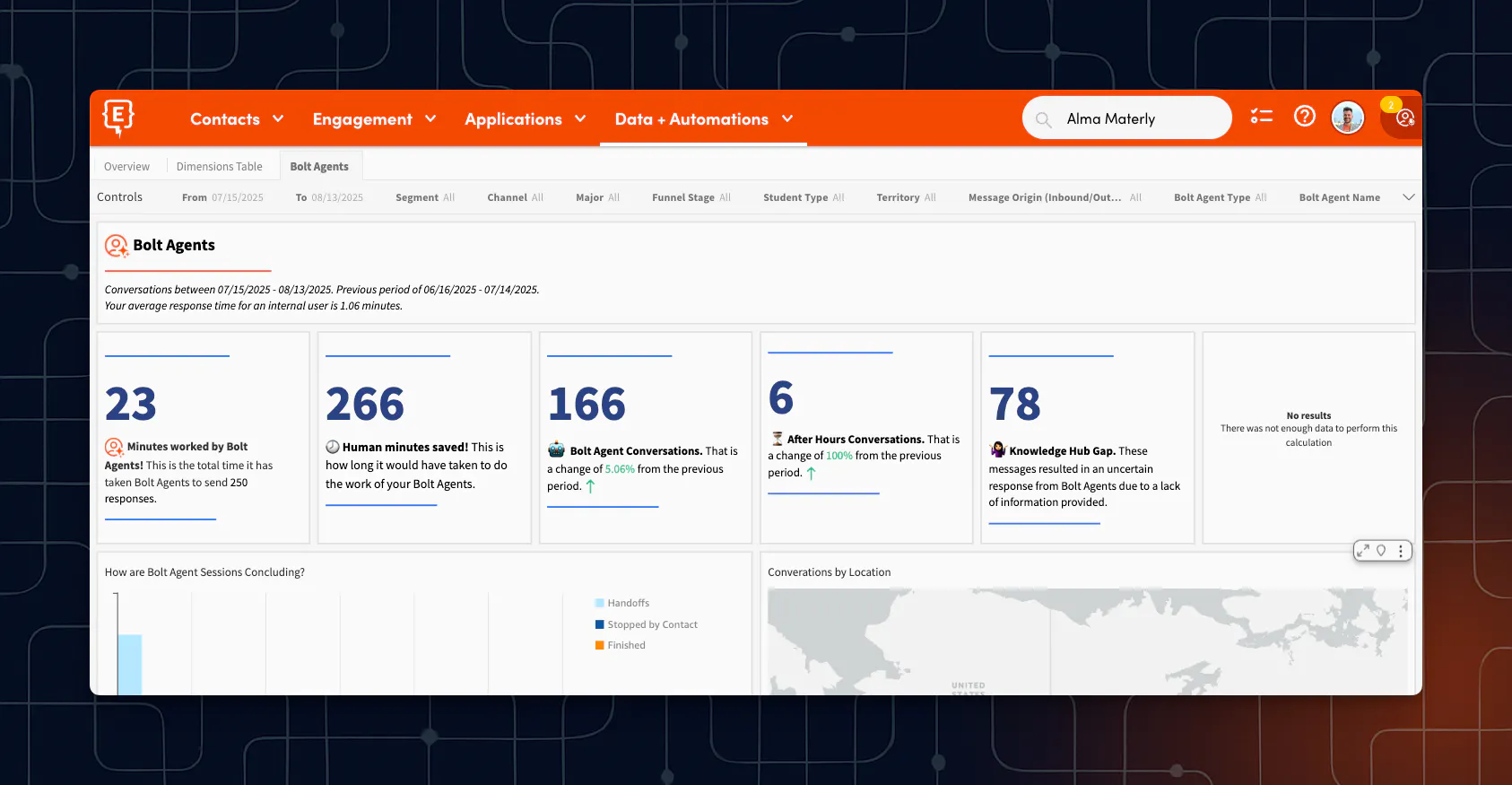
◉ Use Insights Dashboards in Element451 to track Bolt Agent and Knowledge Hub performance.
◉ Review metrics on knowledge gaps, top-performing articles, and agent activity to identify improvement opportunities and prioritize updates.
✨ Pro Tip: Schedule regular reviews (monthly or quarterly) to stay ahead of emerging trends and address gaps before they affect response quality.
Bolt Agents Deliver Best-in-Class Live Chat Engagement
Beyond cost savings, institutions report higher student satisfaction, faster funnel movement, and stronger engagement thanks to multilingual, always-on replies in live chat.
◉ 60–80% reduction in support costs, as AI handles routine inquiries and frees up staff for high‑impact conversations
◉ Instant 24/7 responses, including multilingual support, significantly raise engagement and accessibility for global and underserved students
◉ Up to 40x ROI, as AI chatbots not only reduce staffing needs but also increase enrollment and retention through improved response rates and student satisfaction
◉ Complete inbound coverage: Schools using Live Chat with Bolt Agents reduce unanswered inquiries to nearly zero.
Bolt Agents
Handling Inbound Inquiries via Live Chat

Frequently Asked Questions
Book a consult now.
Ready to See It Live? Spin up your Agent Live Chat Response playbook in 15 minutes.
Loading form…